> For the complete documentation index, see [llms.txt](https://support.portsip.com/llms.txt). Markdown versions of documentation pages are available by appending `.md` to page URLs; this page is available as [Markdown](https://support.portsip.com/portsip-communications-solution/configuring-sip-trunks/gamma-sip-trunk.md).
# Gamma SIP Trunk
[Gamma ](https://gammagroup.co/products/sip-trunking-call-management/)is the UK’s leading SIP trunk provider. [Gamma SIP Trunks](https://gammagroup.co/products/sip-trunking-call-management/) connect cloud PBX and on-premises PBX systems directly to the Gamma network over an Internet connection, enabling call origination and termination on the public telephone network (PSTN).
Configuring a Gamma SIP trunk in PortSIP PBX is straightforward. Follow the steps below.
***
### Step 1: Sign Up and Purchase Numbers
* Create an account with [Gamma](https://gammagroup.co/products/sip-trunking-call-management/).
* Purchase your **DID numbers** from Gamma.
* Ensure your PortSIP PBX has a **static public IP address**, as Gamma uses **IP-based authentication**.
***
### Step 2: Configure the Gamma Trunk in PortSIP PBX
1. Sign in to the PortSIP PBX Web Portal as System Administrator.
2. Navigate to **Call Manager > Trunks**.
3. Click **Add** and select **IP Based Trunk**.
> **Note**\
> Gamma SIP trunks are configured in PortSIP PBX as **IP-Based Trunks** (not Register-Based Trunks).
4. Complete the basic trunk settings according to the **Configuring the SIP Trunk** guide:
* Trunk name (for example, `Gamma-IP-Trunk`)
* Brand: **Gamma**
* Hostname or IP address: Provided by Gamma
5. Save the trunk configuration.
\
The Gamma trunk appears in the trunk list with the status **Online** (expected for IP-Based Trunks).
***
### Step 3: Set Up Inbound Rules
After the Gamma trunk is successfully added:
1. Navigate to **Call Manager > Inbound Rules**.
2. Click **Add**.
3. Select the **Gamma IP-Based Trunk**.
4. Enter the **DID or DID range** provided by Gamma.
5. Choose the destination (extension, ring group, queue, etc.).
6. Save the rule.
***
### Step 4: Adjust Outbound Parameters (Required for Gamma)
Gamma requires specific SIP header formatting for outbound calls. You must adjust the **Outbound Parameters** of the trunk.
#### Steps
1. Navigate to **Call Manager > Trunks**.
2. **Double-click** the configured **Gamma trunk**.
3. Open the **Outbound Parameters** tab.
4. Configure the following fields:
**Contact: User part**\
Select **OutboundCallerID**\
*(Outbound caller ID taken from the PortSIP Web Portal)*
**From: User part**\
Select **OutboundCallerID**\
*(Outbound caller ID taken from the PortSIP Web Portal)*
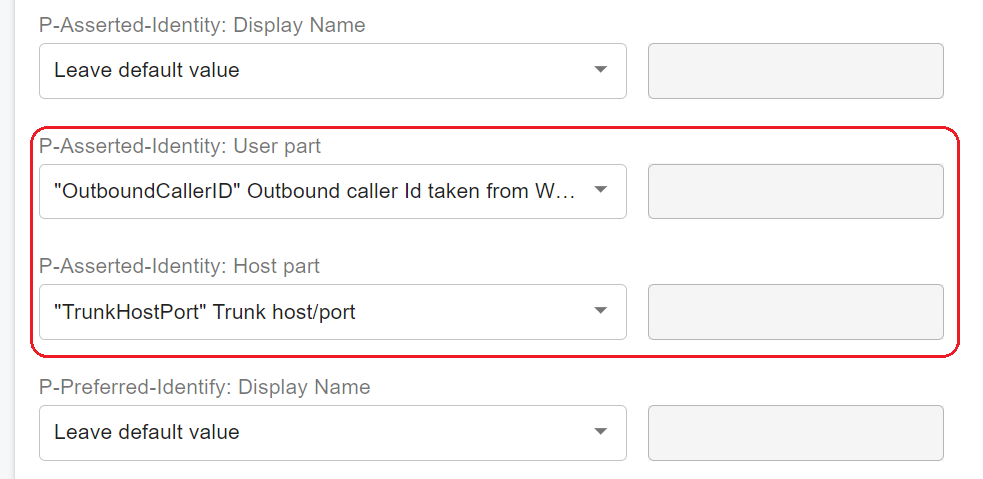
**P-Asserted-Identity: User part**\
Select **OutboundCallerID**\
*(Outbound caller ID taken from the PortSIP Web Portal)*
**P-Asserted-Identity: Host part**\
Select **TrunkHostPort**\
*(Trunk host and port)*
5. Save the changes.
> **Important**\
> These settings are **mandatory** for Gamma to correctly identify and accept outbound calls.
***
### Step 5: Set Up Outbound Caller ID (CLI)
Gamma requires the **CLI (Outbound Caller ID)** to be presented in **E.164 format**.
* The number **must include a leading `+`**
* Example (UK):
```
+4415154108
```
When configuring the **Outbound Caller ID** for an extension in PortSIP PBX, ensure the number is entered in this format.
***
### Step 6: Create Outbound Rules
You can now configure outbound call routing:
1. Navigate to **Call Manager > Outbound Rules**.
2. Click **Add**.
3. Define the dialing conditions (number patterns, call type, etc.).
4. Select the **Gamma trunk** as the outbound route.
5. Save the rule.
For more details, please refer to [Call Route Management](/portsip-communications-solution/portsip-pbx-administration-guide/8-call-route-management.md).