> For the complete documentation index, see [llms.txt](https://support.portsip.com/llms.txt). Markdown versions of documentation pages are available by appending `.md` to page URLs; this page is available as [Markdown](https://support.portsip.com/v16.x-maintenance-mode/high-availability-v16.x/high-availability-and-scalability-on-aws/upgrading-high-availability-installations.md).
# Upgrading High Availability Installations
{% hint style="info" %}
Before upgrading the PBX HA, please consult with PortSIP support to ensure the versions are compatible.
{% endhint %}
Please follow the below steps to upgrade your current PBX HA.
## Back up data
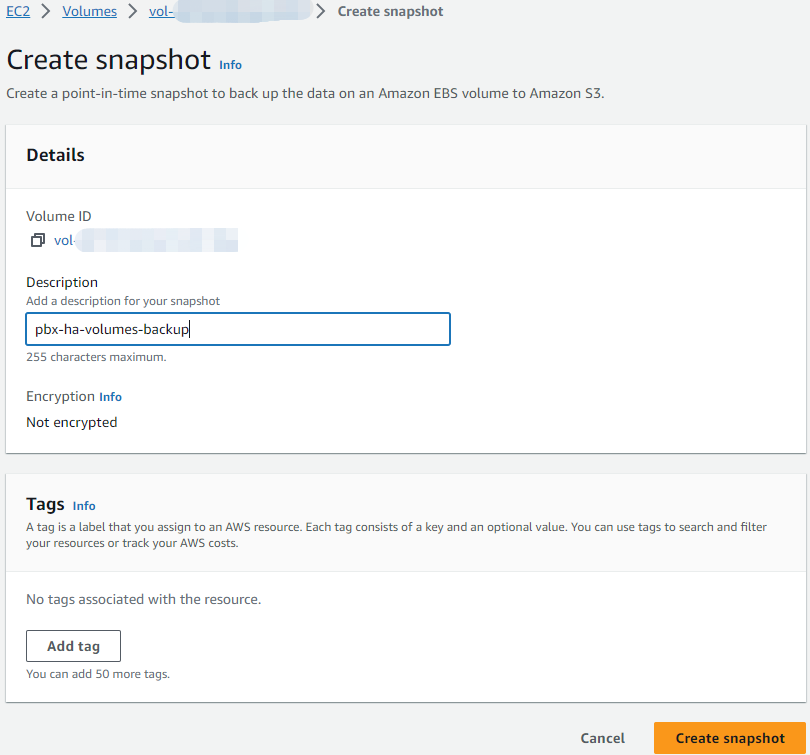
Before upgrading, you can create a snapshot of the EBS. This allows you to roll back your changes if necessary. Here are the steps to follow:
* In the Amazon EC2 console, in the navigation panel, choose **Elastic Block Store**, and select **Volumes**.
* Select the check box for your **Volume** that be used in HA, choose **Actions**, and **Create a snapshot**.
* Under Description, enter "pbx-ha-volumes-backup".
* Choose **Create Snapshot** to create a snapshot.
## Download and Update Resources
Perform the below command only on the EC2 instance **ip-172-31-16-133.**
```
cd /opt/ && rm -rf portsip-pbx-ha-on-aws-guide-16.tar.gz \
&& sudo wget -N https://www.portsip.com/downloads/ha/v16/portsip-pbx-ha-on-aws-guide-16.tar.gz \
&& sudo tar xf portsip-pbx-ha-on-aws-guide-16.tar.gz
```
## **Update PBX**
Use the new version image of PortSIP PBX to update the PBX.
{% hint style="danger" %}
Please contact PortSIP support to obtain the **\** before upgrading.
{% endhint %}
Perform the below command only on the EC2 instance **ip-172-31-16-133.**
```
cd /opt/portsip-pbx-ha-guide/ && \
/bin/bash update.sh
```